Author: Lisa Lang Blakeney

  • Scrivener Tips: How To Label Your Scenes By Point Of View

    I write New Adult Contemporary Romance. In this genre, many authors like myself will write from a dual point of view. This can make things very tricky when you’re writing and editing a novel, as it was for me when I was first writing Cousins. I had no quick way of visually seeing what chapters were in what point of view in Word and even when I first started using Scrivener, I didn’t know what to do. But it’s super easy to label your scenes and chapters with a point of view in Scrivener. I’ll show you:

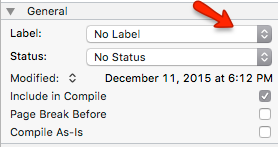
    In the right hand column of Scrivener, in the notes section, scroll down to the “General” section where you will see this image. You will be working with the Label drop down area. When you drop this down you will see default labels such as: notes, chapter, scene, etc. But the cool thing about Scrivener is that you can EDIT these labels.

    1. Click on the label drop down button and then click on EDIT.
    scrivener tip

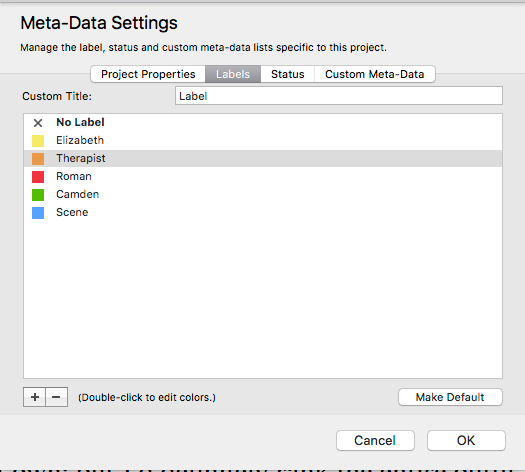
    2. When you click on EDIT, a Meta-Data box will open where you can start filling out your label information like this:
    scrivener tips

    3. Simply click on the color label you’d like and edit the NAME of that label. You can add or eliminate labels and play with the colors. Then click OK to save.

    4. Now that you’ve made your labels, you go back to the chapter or scene you were working in and select the label that is appropriate for that scene. For example, when I write scenes written in the point of view of my protagonist Elizabeth, I select the yellow Elizabeth label.

    scrivener tip

    5. If you view your entire manuscript in corkboard mode, you will see that all your cards have been color coded by their labels in the right hand corner. That means with a quick glance, you can see a synopsis of each of your scenes and whose point of view each are in!
  • How To Find The Address To Your Kindle

    Many authors will give ARCs to beta readers or published copies of their books to winners of contests, etc. by sending their books straight to your Kindle. I do this all the time, especially during Facebook parties.

    In order for you to receive the book though, you have to do two things:

    1. You must give the author your Kindle email address.
    2. You must add the author’s email address as one of your approved Kindle email addresses.

    So now I bet you’re wondering, well where the hell do I find all of that? I’ll tell you.

    How To Find Your Kindle Email Address

    Via Kindle App (Fast Method)

    1. You can find your Kindle email address directly from the Kindle App on your device.
    2. Login to your device (ex. iPad or iPhone).
    3. Click on the settings wheel that you’ll typically find in the lower right hand corner
    4. Save the email address you see under: SEND-TO-KINDLE EMAIL ADDRESS

    Via Amazon (Slower Method)

    1. Login into your Amazon account.
    2. Toward the top right of the Amazon.com home page, you should see a button/section that says “Hello, [your name or “sign in”] Your Account”. Hover your mouse over (don’t click on) the Your Account button/section.
    3. From the menu that appears, click on “Manage Your Content and Devices”
    4. When you arrive at the Manage Your Content and Devices page, there are some tabs at the top. Click on the “Your Devices” tab.
    5. Your Kindle device and any devices that have the Kindle application (e.g., smartphone, iPad, computer, etc.) will be listed here with picture icons. Click on the device where you want to receive documents or eBooks.
    6. Clicking on the icon for the device of your choice should display, just below the icons, an e-mail address that ends in @kindle.com. THAT’S the e-mail address of that Kindle device/app. Save it.

    How To Add An Approved Recipient Email Address

    1. Login to Amazon and go to the “Manage Your Content and Devices” page.
    2. Click on the “Settings” tab at the top (just right of the “Your Devices” tab)
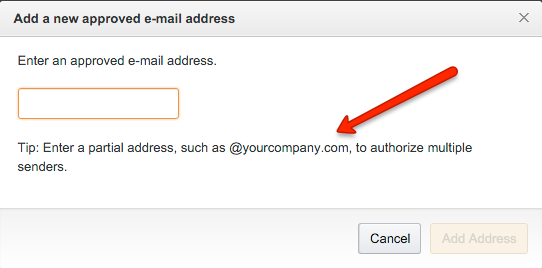
    3. At that new page, scroll down to the section titled “Personal Document Settings” and there is a sub-category titled “Approved Personal Document E-mail List” and click on the link “Add a new approved e-mail address.”
    4. In the box that appears, type in lisalangblakeney@gmail.com (or the e-mail address of the author sending the eBook).
    5. Click the “Add Address” button.
    6. If you will be receiving books from more than one author, you may want to add @gmail.com as an approved sender so that you can receive books with anyone sending from a gmail account without having to add them all individually. (Most indie authors will have a gmail account).

    kindle email address

  • Holiday Blog Hop Giveaway 2015

    blog hop

    Welcome to the blog of author Lisa Lang Blakeney! If it’s your first visit, I’d love for you to check out my steamy new adult contemporary series Cousins. The series is free on Kindle Unlimited and has over 100+ five stars on Amazon. And if you’re already a fan, I FRACKIN’ LOVE YOU!

    There are lots of new book blogs and authors for you to check out during this holiday hop! Just CLICK THE LINK BELOW, follow the instructions on the giveaway widget, and earn entries as you explore and find some new favorites for a chance to win a $350 Visa Gift Card. This giveaway is open internationally and will run from December 1st – 24th.

    ♥ This Giveaway is made possible by all those who have donated. Please DO NOT follow or like a page unless you truly want to be a follower. All entries are verified. Don’t like and follow and then unfollow these pages. These type of entries will be voided and removed.

    CLICK HERE: https://gleam.io/fb/MViAj395418210555128

  • International Cousins Paperback Giveaway

    international paperback giveaway

    I was notified by KDP that I am a Kindle Unlimited All-Star in the Amazon UK store for the sales month of October. Eeeeepppp!!!! Honestly, I wasn’t expecting this at all and I am very grateful. Thank you soooo very much to my international readers who have made this possible. In honor of your support, I am going to give away a signed Cousins paperback to ONE international winner.

    To enter, please click on the link below and LIKE, SHARE, & COMMENT on the post you find there. TAGGING a friend is optional but welcomed:)

    https://www.facebook.com/AuthorLisaLangBlakeney/photos/a.868080593288885.1073741825.395418210555128/934536316643312/?type=3

    This contest is open ONLY to international readers. Please share with folks you know who live outside of the U.S. It will run from 11-17-15 to 12-1-15, 12am EST. Winner will be announced within 3 days. *Facebook has nothing to do with this giveaway. This is all me!

  • Books In A Bag Holiday Giveaway!

    lisa lang blakeney giveaway

    The holiday season is my favorite time of year! November is a time of thanks and December a time of giving. I’m so incredibly thankful for so many things in my life, especially for the many new people I’ve met during my journey as a new author. So in return, I want to express my thanks to all alpha romance readers out there by giving away one *Marc Jacobs handbag stuffed with signed paperback copies of Cousins One & Cousins Two.

    HOW TO ENTER 

    ★ LIKE my author page: http://facebook.com/authorlisalangblakeney

    ★ SHARE the post about this giveaway on Facebook.

    ★ FILL out the entry form here: https://goo.gl/6oZ609

    CONTEST DETAILS

    ★ Contest is open to U.S. readers only.

    ★ Only ONE entry per person permitted.

    ★ Contest will be open November 12 – December 3. 2015. The contest will close at 12/3/15 at 12am EST. The winner will be chosen within 3 days and will be notified via email and announced on this blog as well as Facebook.
    THIS CONTEST IS NOW CLOSED: Winner Is Pennie Adams

    ★ If you have any questions, please feel free to send me a private message via Facebook.

    ★ Good Luck!

    CONTEST DISCLAIMER

    ★ Neither Facebook nor Marc Jacobs ® have anything to do with this contest/giveaway. They shall not be held liable for any part of this contest. This is all my doing:)

    * The Marc Jacobs bag is a like new black patent leather satchel with silver detail. Estimated value $300. It will be sent to you in it’s original dust bag, along with your signed paperbacks. As many of you know, I have a handbag problem:) I buy them and never use them. So this is my way of rehoming them without selling them. Enjoy!


  • Does BookTrakr Work?

    what is booktrakrWhat Is It?

    BookTrakr is a website where authors can track sales of their books in various marketplaces including: Amazon, Createspace, Barnes & Noble, Google Play and iBooks. It’s a convenient way to track sales under one roof, and honestly it’s really the only game in town if you want to do so without doing all the heavy lifting yourself.

    Why I Signed Up

    I signed up with BookTrakr because I’ve found that the monthly reports that Amazon generates (excel spreadsheet) are very difficult to read, understand, and foreign sales numbers are not in USD. When you see your sales in BookTrakr, it gives you figures in USD amounts for all sales in domestic and foreign markets. Sales are generally up to date, up to 24 hours before. So if you go on the site today, you’ll probably see up to date sales for yesterday and prior. You’ll have to wait until tomorrow to see the current day’s totals.

    What I Like

    The interface of BookTrakr is highly user friendly. Books are color coded. You can see sales and lending/KU income separately. It’s also highly accurate. Sales figures reported were only about $20 off what Amazon actually sent me one month and maybe $12 off another month. My assumption is that the total figures for Amazon income can be a bit skewed based on Kindle Unlimited income. (I’m not sure about other marketplaces, because I’m currently on Amazon exclusively.)

    What I Don’t Like

    I don’t like that you have to give your sign-in credentials for each marketplace in order for them to pull your sales figures. In today’s world of hackers, it seems a little risky, but you have to weigh the pros and cons. This site was created by a man and his wife who is also a fiction author. They have skin in the game, so I know that they will do their best to keep our information secure. As best as any company can do. The payoff is worth it to me. I hate not having any idea what my KU income is going to be. BookTrakr lets me know on a daily basis what I’m making. That’s worth the risk to me.

    What I’d Like To See In The Future

    When you visit the dashboard, you will see all of your books (book covers) and book details on one page. When you write a lot more books and/or have several pen names – this layout can be cumbersome. It would be nice if there was a neater way to display the books as an author’s backlist grows. Especially authors with several pen names.

    How Do They Add Books?

    BookTrakr will automatically add your books to your dashboard once your book has triggered a sale. You cannot add a book manually. This has worked fine for me except for one of my print books via Createspace that seems to be missing. I know that the book has made sales because I have checked in Createspace. So there may be a little glitch with that and there’s really nothing I can do about it. I don’t make a lot of sales in print, so I’m not super worried about it, but it would be nice if I could manually add the book myself.

    Price & Customer Service

    BookTrakr is currently in Beta, so there is no fee at this time. Also the best way to get a customer service response is via their email portal or on Twitter @BookTrakr.